Prompt & Circumstance.
Agents, wizards and eight Raspberry Pis at DocJS and their Model Behavior
Shawn Storie
DocJS moves healthcare paperwork
Drug makers' enrollment forms used to be printed, filled in by hand, and faxed back and forth. DocJS turns each form into a guided online journey: each person gets a link by text or email, fills in and e-signs their part, and the finished PDF goes where it needs to go.
Where AI shows up in the product
Turning PDF forms into phone-friendly wizards, and turning "picture-only" forms into fillable ones.
Where AI shows up in how we build
AI agents write most of the code changes, review them, and run the tests. People decide what gets built and what ships.
A short glossary
AI model
The "brain". Ours is Claude: Opus is the biggest and most careful, Sonnet is faster and cheaper.
Prompt
The written instructions we give a model.
Agent
A model that can take actions (read files, run programs, edit code) and keep going until the job is done.
Claude Code
Anthropic's agent for software work. Most agents in this talk are Claude Code.
Regular ("deterministic") code
Ordinary software: same input, same answer, every time. It can't be talked into anything.
Fillable vs. flat PDF
A fillable form has real boxes you can type in. A flat one is just a picture of a form.
Pull request (PR)
A proposed change to the code. It gets reviewed and tested before it's merged in.
Raspberry Pi
A credit-card-sized computer that costs about $75. We have eight.
The AI drafts.
Regular code decides.
Mistakes get a check, not a plea
When the AI got something wrong, we added code that catches it every time, instead of just asking the AI more nicely.
Facts are copied, never retyped
Field names, positions, page numbers and legal wording come straight from the original document. The AI never retypes them.
AI can't approve its own work
Code only merges when an AI reviewer says yes and the automated tests pass.
Six parts
01 Wizards
Turning a PDF form into a step-by-step form that works on a phone.
02 Flat → fillable
469 picture-only forms made fillable in one night.
03 How we build
AI agents writing, reviewing and testing the code, and the house rules that help them.
04 The Pi fleet
Eight tiny computers running AI agents around the clock.
05 Local AI
Running AI models on our own hardware, for free.
06 Prompting + lessons
What we learned about instructing AI, often the hard way.
From PDF form to phone-friendly wizard
In shortSomeone uploads a form. Minutes later there's a step-by-step version that works on a phone, and a robot has already tested it.
Claude, inside our AWS
Runs through Amazon Bedrock. The cost of every AI call is recorded.
A queue, not a crash
Jobs wait their turn in the database. If a worker dies mid-job, another one picks it up.
~396 wizards so far
For ~369 form templates. "Refine" lets an admin ask for changes in plain English.
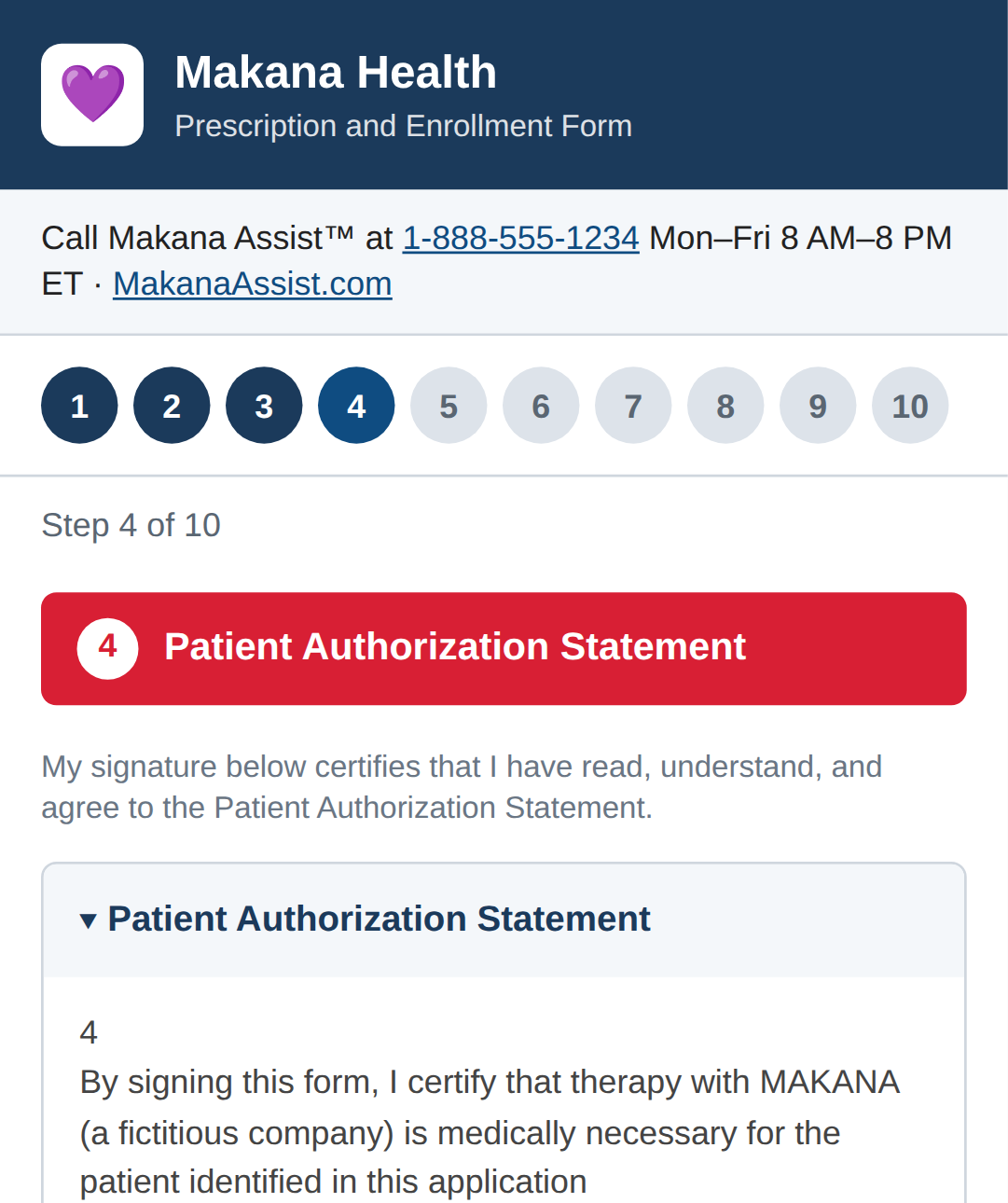
What comes out
- A 10-step phone wizard made from a one-page form
- Steps follow the form's sections; legal wording copied word for word
- Every answer is tied to its exact box on the PDF, so the signed PDF comes out complete
- Fields know what they are (name, phone, date of birth), so phones can autofill and typos get caught
- Tested at phone size before anyone sees it
Demo form with fictitious company and patient.
Teaching it what each field means
In shortBefore building anything, AI labels every box on the form. Then a second pass checks the first one's homework.
- Pass 1, for every field: a clear name, who fills it (patient, doctor, pharmacy), its type, and a format rule
- Fields are mapped to the healthcare data standard (FHIR), so known patient details can be pre-filled
- Pass 2 is a reviewer that's told which fields were missed or made up. Code computes that list; nobody guesses
- Positions and page numbers are always copied from the original: "Claude might round them"
Big forms
Split into chunks of 100 fields, 5 at a time. A 705-field form: 10 minutes, $5.77.
Never pay twice
Upload the same PDF again and the earlier answer is reused for free.
People win
AI only fills in blanks. It never overwrites a setting a person made, and never assigns roles on its own.
Instructions written from bug reports
In shortEvery time the AI got something wrong, we added a specific rule to its instructions, with the reason.
- A blueprint: every wizard uses the same buttons and structure, so the testing robot always knows where to click
- Legal text is swapped for placeholders while the AI writes, then the exact original wording goes back in
- Fix requests are narrow: here's the problem list and the screenshots. "Fix ONLY the listed issues"
- A fix is kept only if it reduces the number of problems
Nothing ships without passing code checks
In shortFour small pieces of regular code check every wizard. Each one exists because the AI once got that exact thing wrong.
No pre-filled answers
Clears any pre-selected choice. The AI kept defaulting Sex to "Female", which would have been submitted silently.
Every box can be typed in
Unlocks any field the AI locked, and rejects a wizard that has no real form fields at all.
Structurally complete
Every section closed, every step present, a working Next button. Checked with simple pattern matching on purpose, because a forgiving web browser hides exactly these mistakes.
Not cut off
If the AI ran out of room mid-answer, that's a failure, never a page. A failed fix can never replace a good version.
What went wrong, and the fix
| What broke | What happened | Fix |
|---|---|---|
| Answers in the wrong box | Two fields both labeled "Last Name" got merged, so pre-filled data landed in the wrong place | Use the PDF's own field names, exactly |
| 35 of 38 doctor fields locked | The AI locked them even with the right instructions. We first blamed the wrong instructions | A code check, plus a record of exactly which instructions ran |
| Page cut off midway | The AI hit its length limit; the half page was saved and the Next button was dead | "Ran out of room" now counts as a failure |
| Doctors couldn't sign | The format rule on the signature box was too short for a signature image | No format rules on signature fields |
| Anyone could edit the AI's instructions | Saving new instructions didn't require a key | A key for every change |
| Legal text shortened | A doctor's certification statement shrank to a stray "6." | Legal text copied word for word |
469 forms that were just pictures
In shortMany drug-maker forms look like forms but have nowhere to type. People had to print, write and fax them.
First, regular code finds the blanks:
- drawn lines, empty table cells, ____ runs and checkboxes
- the nearest text becomes the label: "the label is found, never required"
- it works out the order a person would fill them in
- the same input always gives exactly the same output, so changes are easy to test
…and that wasn't enough
First try: 0 of 25 approved. A 42-form pilot: 4 approved (10%). Tuning the rules for one kind of form kept breaking another.
Code drafts, Opus corrects, Sonnet checks
In shortEach form gets a first draft from code, corrections from one AI, and an independent check from another AI that looks at pictures of the result, like a person would.
- Opus returns a list of edits (add, move, rename), not a whole new form
- It gets every line of text with its exact position: "your ruler"
- Rejected? The checker's reasons go back to Opus for one more try
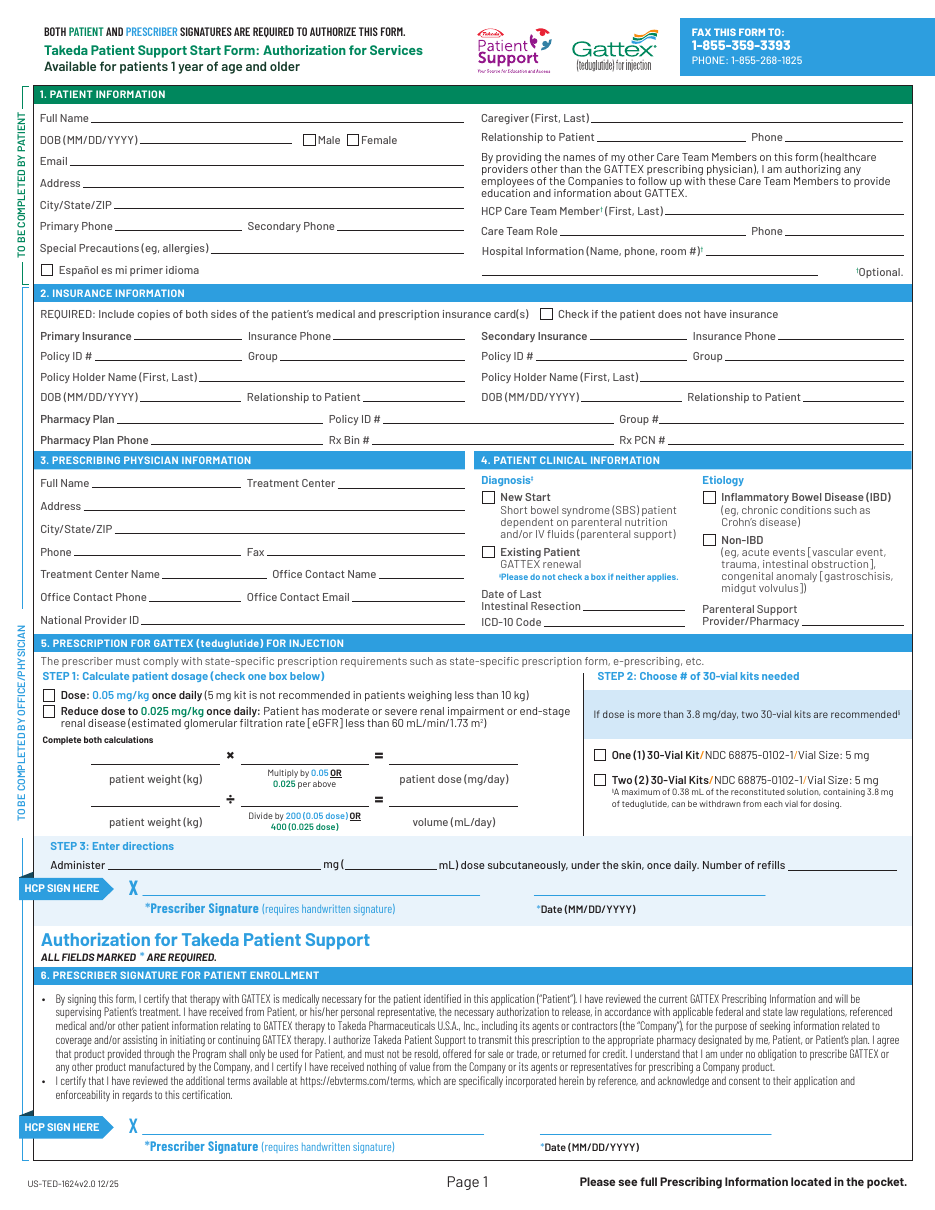
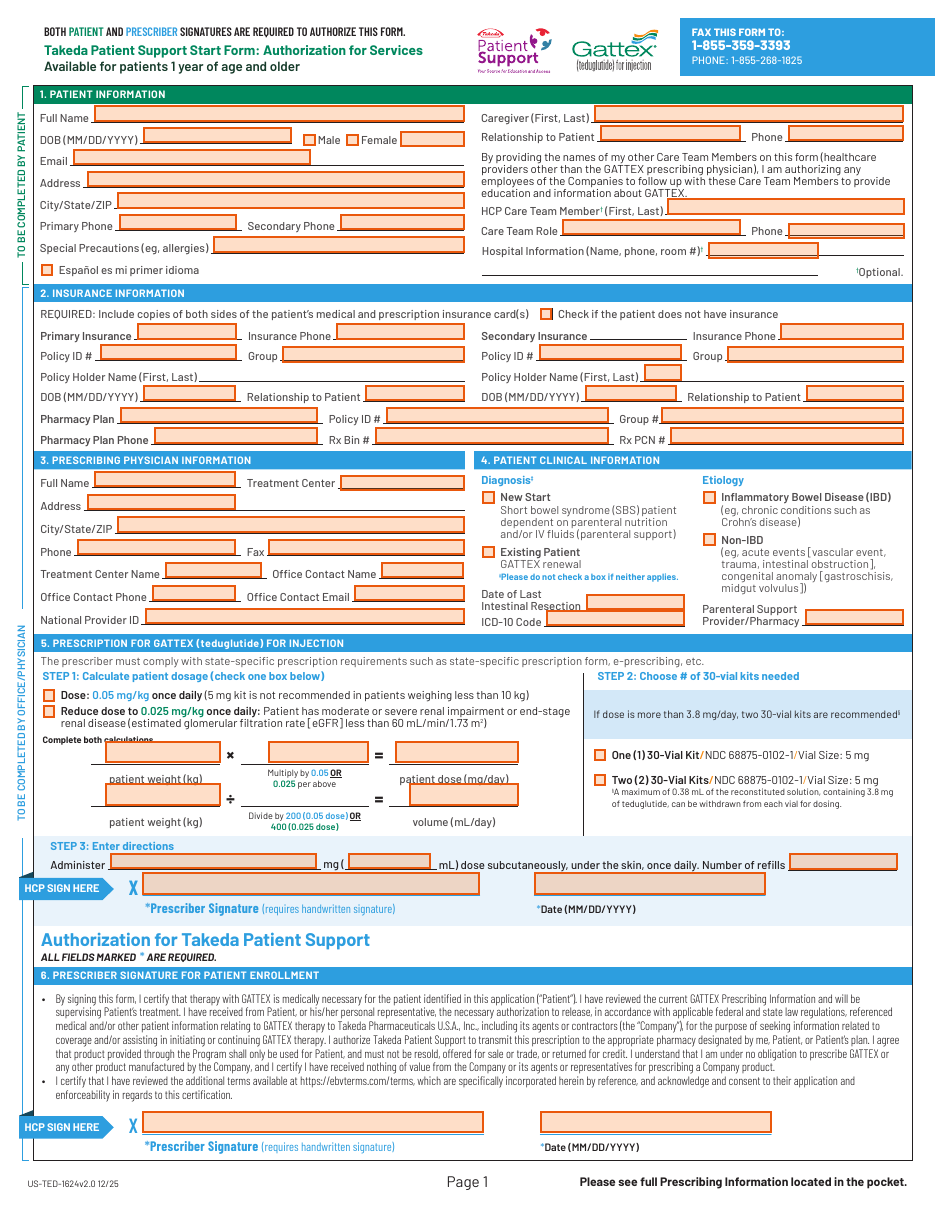
A real enrollment form
- Two pages, patient + doctor, with nothing to type into
- Code found the lines and boxes; Opus fixed labels and missed blanks
- Each box gets a readable name from its label, like
Full_Name - The checker still spotted 2 missed blanks, so it waits for a person to sign off
One night, seven Raspberry Pis
In shortWe queued all 469 forms in the evening. By 9 the next morning every one had been processed, with nobody watching.
228 went to a person, and they were mostly not forms
225 were brochures, drug-information sheets or FDA documents. The "is this even a form?" step caught them.
It ran itself
A supervisor program restarted stuck Pis, emailed progress, and paused the work before we hit our AI usage limits.
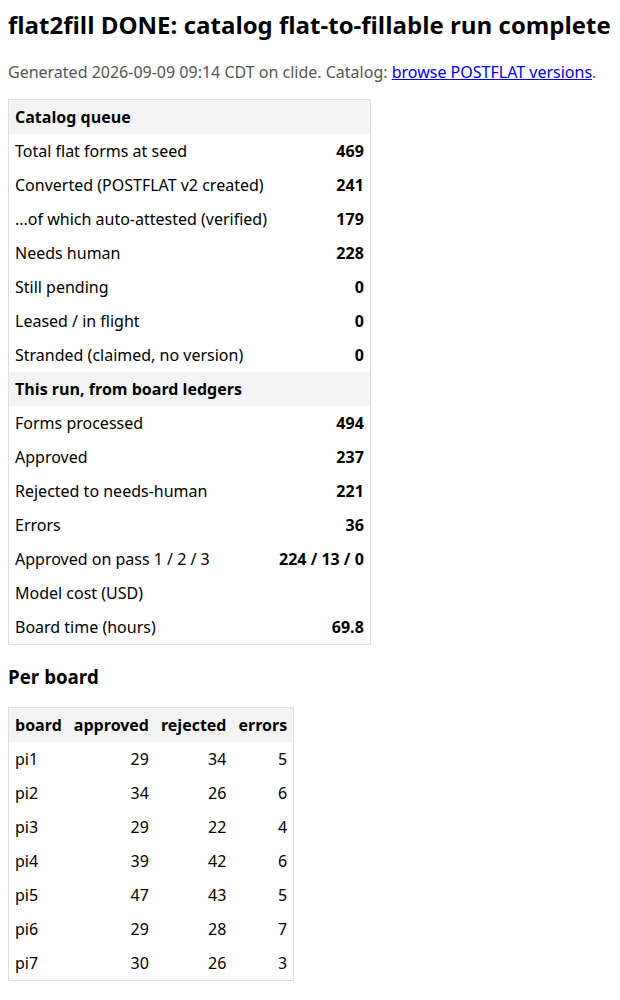
The "done" email, and the catalog
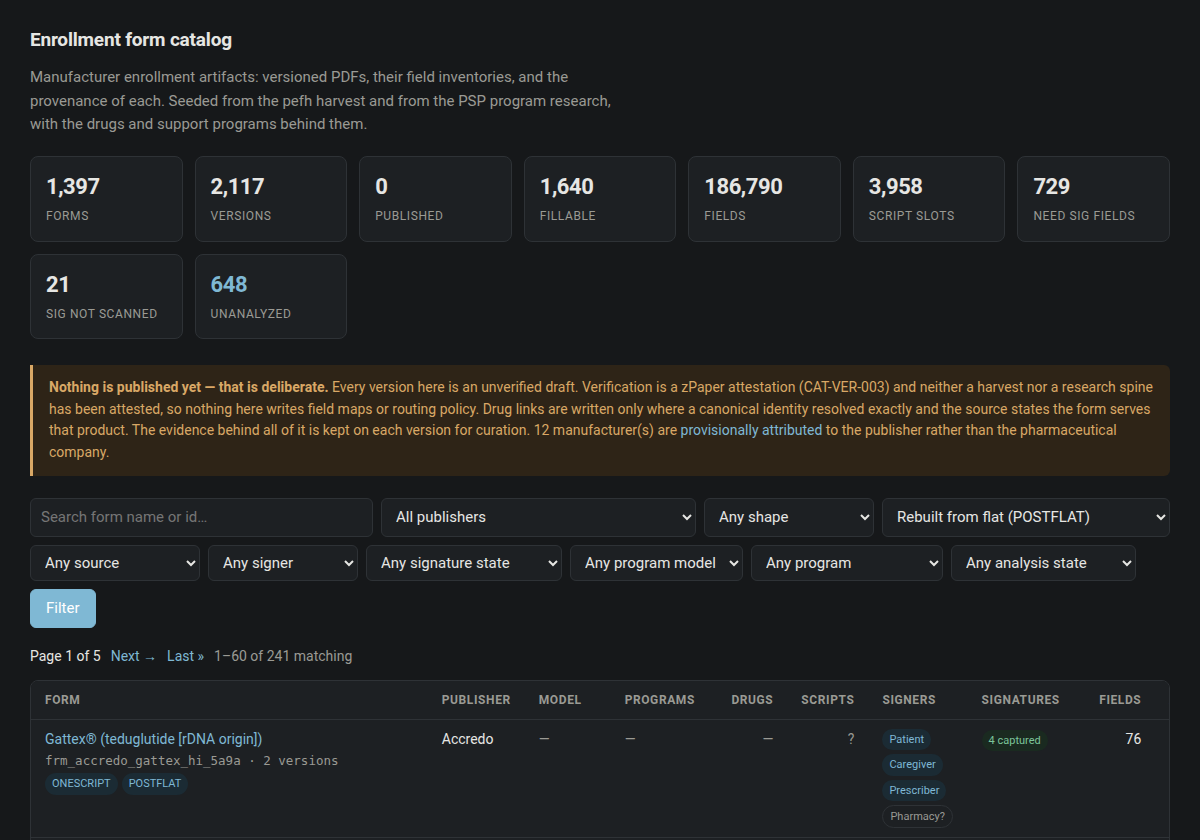
Every converted form is saved as a new version next to the original, with the checker's notes attached. Nothing goes live until a person signs off.
House rules, written for agents too
In shortEpic Beast is zPaper's standard tech stack: nine choices, one per letter. One right answer per choice means the AI guesses wrong less often.
containers
database
infra as code
cache
runtime
web server
cloud
storage
language
How agents fit in
- Each agent gets its own copy of the code to work in
- Tools are simple command-line programs an agent already knows how to use
- Tasks are text files it can search, just like code
- Agents report by email, where people actually look
Rules that help the agent
- No file over 1,000 lines: small files fit in the AI's working memory
- Code with type errors can't be committed
- Cleanup work gets the same priority as features
- One standard answer per decision = fewer wrong guesses
Why no file over 1,000 lines?
In shortAn agent works best when it can read a whole file at once. Big files get read in pieces, and agents confidently edit the part they saw.
Why it helps an agent
- It fits in one read. 1,000 lines is roughly 10,000 tokens: small enough to see whole, with room left to think
- Edits land in the right place. Agents edit by finding exact text; giant files repeat themselves, so the match gets ambiguous
- Fewer collisions. Several agents work at once; small files mean they rarely touch the same one
- People can review it. A focused file has one job you can hold in your head
Why 1,000 exactly? It's a round number, not magic. The ratchet is what matters.
The ratchet
Files already over the limit were grandfathered, but they can only shrink. Checked when code is committed, when it's pushed, and again in the test gate, so there's no way around it.
The splitting itself is agent work: the refactoring skill, 4 files at a time.
From a task to finished code
In shortA ClickUp task becomes an agent's job. It writes the code and tests, other AIs review it, automated tests decide, and it merges only when both agree.
The agent's job description
Plan, post the plan on the ticket, write tests, label every change with the ticket number, hand it in for review when done.
Tests decide
Every change is built and tested in the cloud, for about 3 cents a run. It fails only on problems this change caused.
Then it ships
The release pipeline (Manifest) pushes to dev, then QA, with health checks along the way.
Our instructions file is scar tissue
In shortClaude Code reads a file called CLAUDE.md before every task. Ours is ~320 lines, and most lines exist because something once broke.
- House rules with reasons, e.g. "tests looked green but were skipping their setup", so it doesn't repeat our mistakes
- Specialist helpers: a Bun expert, an Elysia expert, a refactoring agent
- Shortcuts: one command splits every oversized file, 4 at a time in parallel
- Phone alerts when an agent finishes or gets stuck
Turn lessons into tests
A written rule is a suggestion; a failing test is a fact. File-size limits, no patient data in logs, pinned versions: all enforced by tests now.
AI reviewers need checking too
Gemini reviewed our code: of 53 issues, 12 were wrong and 23 overstated. Its 3 "critical" issues turned out to be 0.
What it adds up to
Eight Pis, eight Claude Codes
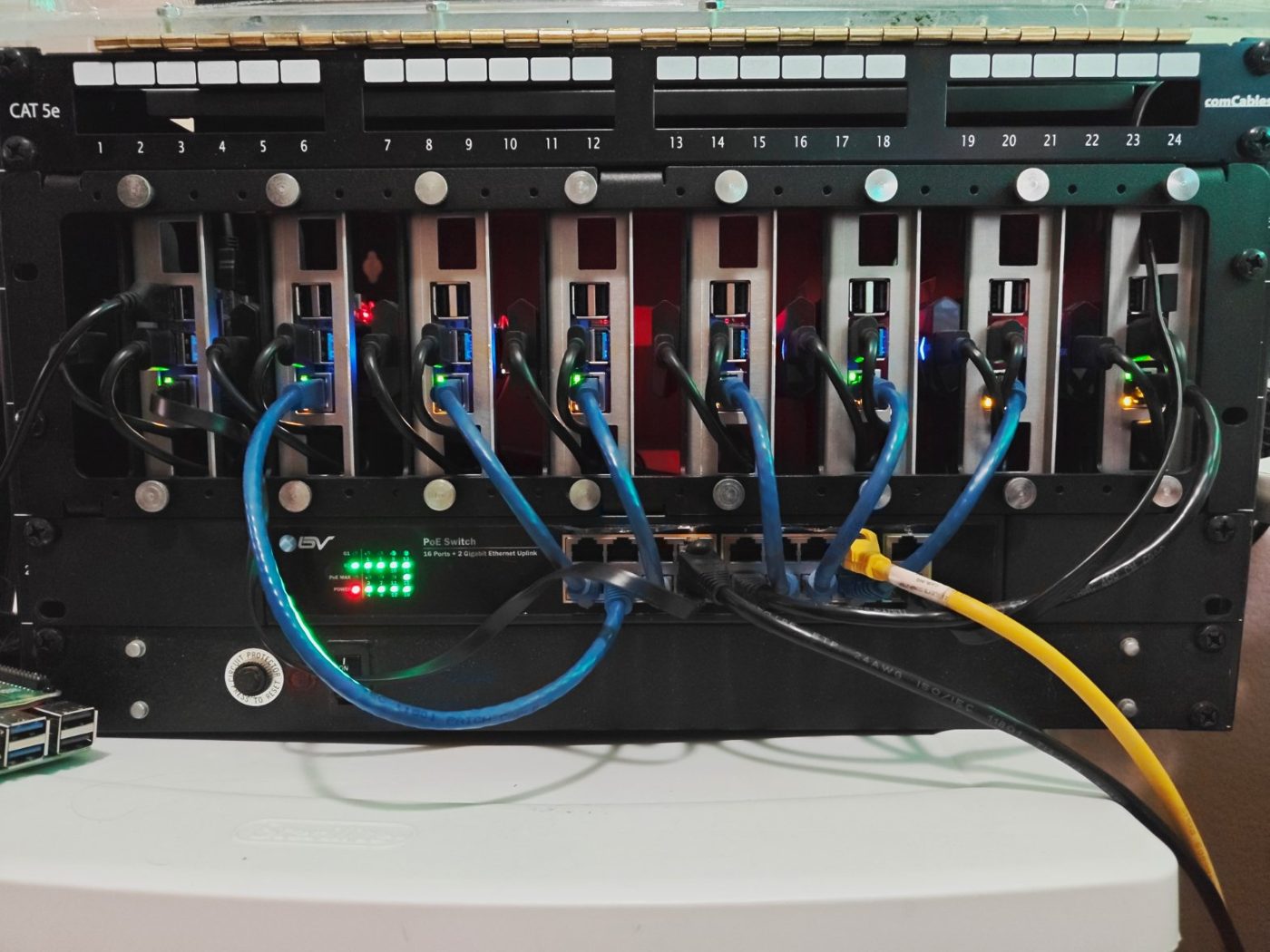
In shortEight $75 computers in a rack, each running its own AI agent, day and night.
- 8 Raspberry Pi 4s, powered through their network cables, each with its own 1 TB drive
- Each has Claude Code and a full copy of the DocJS code
- One coordinator hands out jobs; seven do the work
- Each has its own tile on a wall of screens
Why Pis?
Cheap, always on, and contained: a job that goes wrong only affects one Pi, and the Pis hold no keys to our main computers. Building all of DocJS on one takes about 2 minutes.
Every job is checked out, like a library book
In shortJobs go into a queue. A Pi checks one out at a time; if it doesn't check back in, the job goes back on the shelf.
Rules on purpose
- No job runs without being checked out, so we always know who's busy
- Nothing restarts itself quietly: hiding a crashing Pi is worse than a visible one
- The open door can't do anything dangerous: it can't reboot a Pi or start a job
- A "drain" switch: finish this job, then stop
Learned the hard way
- Jobs from a dead Pi got retried forever
- One deploy command wiped every Pi's job history
- Running all 9,500 tests on a Pi gives fake failures: test only what you changed
- Our code rejects commits signed by an AI, so Pi agents are told not to sign
Every agent gets a screen
A screen of its own
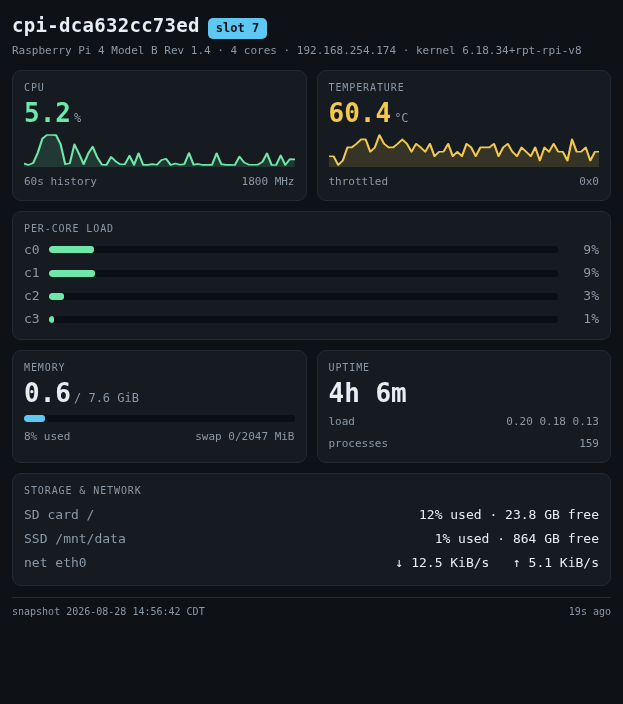
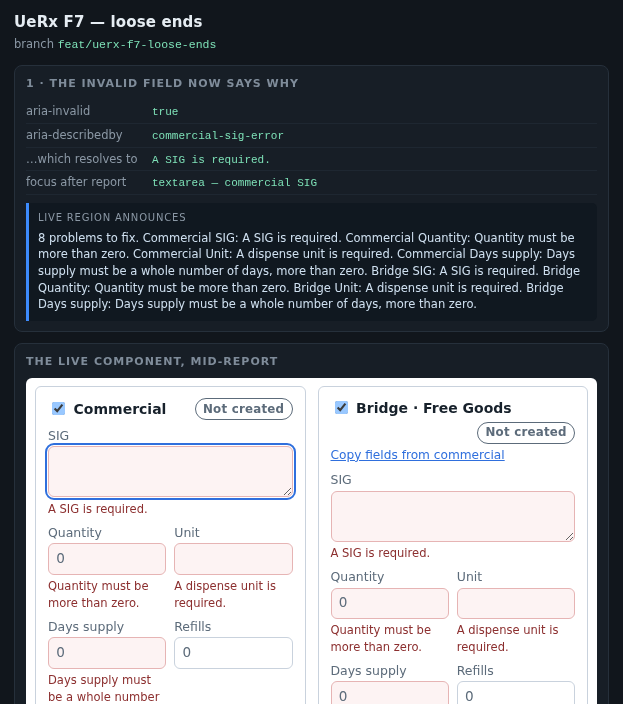
The Pis have no monitors, but each gets a tile on a shared wall of screens. Its instructions say "You have a display anyway. Use it." The agent decides what to show: progress, a table, a screenshot, or a question for a person. One command, disp, puts any web page on its tile.
How the agents are built
- Each job starts a fresh Claude Code session with no human at the keyboard ("headless")
- A small program watches every step the agent takes and shows live progress on its tile
- If the agent draws its own tile, it gets 2 minutes before the progress display takes over
- Stuck?
disp --askflags the Pi on the control panel so a person notices - For AWS questions, Pis ask a separate assistant built with Anthropic's Agent SDK: read-only, and guarded by code
AI on our own hardware
In shortBesides Claude in the cloud, we run free, open AI models on one powerful desktop. No per-use cost, and the data never leaves the building.
One AMD "Strix Halo" desktop with 128 GB of memory holds models with 35 to 120 billion parameters:
| Model | Size | Speed* | Used for |
|---|---|---|---|
| gpt-oss-120b | 63 GB | 55 | reading web pages |
| Ornith 35B | 36 GB | 54 | code review |
| Qwen Flash-Next | 98 GB | 28 | agent work |
| Gemma 4 26B | 16 GB | 53 | quick second opinions |
* tokens per second, roughly words per second
Why bother
- Free to run, so we can rerun it every night
- Data stays in the building
- No usage limits: a cloud AI review ran out of quota before it finished
The catch
- It gets hot and slows down (~28 → 6–15) on long jobs
- Smaller and less capable than Claude: good for volume, not judgment
- "Thinking" models need extra room, or the answer comes back empty
Same agent, local brain
In shortClaude Code can be pointed at a model on our desktop instead of Anthropic's cloud. It's the same agent with a different brain.
Our model server speaks the same language as Anthropic's, so it's a few settings:
ANTHROPIC_BASE_URL=http://127.0.0.1:8095 \
ANTHROPIC_MODEL=ornith \
  claude -p "fix the failing tests"
The catch
Claude Code's built-in instructions are long (~15 s for a local model to read). Fine for real agent work; wasteful for 1,000 quick one-file reviews. That's the next slide.
Local for volume, Claude for judgment
In shortThe plan: a free local model reviews every file overnight, anything it can't back up with a quote gets thrown out, and Claude double-checks only the top 30.
Keep it simple
Reviewing one file needs no tools, so we skip the full agent and its long instructions.
It can't make things up
The organizer can only point to findings by number. It can't rewrite or quietly drop them.
Test it first
Run it on code Gemini already reviewed and compare the results before trusting it on everything.
Faxidermist: 94,000 web pages, read for free
In shortA local model read healthcare facilities' websites and pulled out fax numbers, phone numbers, doctors and form links into a database.
How it works
A queue of websites. A worker fetches each page, and the model fills in the same fixed set of answers for every one. Same pattern as the Pi fleet.
Lessons
- Keep the original input. We only saved the answers, so training a smaller model now means re-fetching everything
- Two models agreeing doesn't make them right: you need a hand-checked answer key
How to instruct an AI model
1 Give it a blueprint, not a vibe
Exact structure, exact output format, a list of edits instead of a full rewrite. A blueprint can be checked by code.
2 Turn every bug into a rule, with the reason
"Don't wire the Next button twice; it skips a step." The reason stops it making the same mistake a new way.
3 Hand it facts that code can compute
What's missing, where each line of text sits. Don't ask an AI to measure what code can measure.
4 Keep fixes narrow
"Fix ONLY the listed issues", with screenshots. Keep the fix only if things got better.
5 Tell the checker the stakes
"You are the only gate." "When you cannot tell, do not approve." Say what a mistake would cost.
6 Ask for less writing
Placeholders for legal text, short codes instead of long answers. Less to write means fewer mistakes and lower cost.
How to instruct an AI agent
1 House rules, with reasons
A short file the agent reads first. Link to longer docs; don't paste them in: the agent opens a link when it needs it. Turn rules into tests when you can.
2 A written job description
Plan, share the plan, test, label the work, hand it in for review. The same steps for every agent.
3 Give it simple tools
Command-line programs with a short how-to. The agent already knows how to use those.
4 Send it the review
Sort reviewer comments into must-fix and nice-to-have, and send back only the must-fixes.
5 Leave room, and check it finished
Give "thinking" models room to think, and treat a cut-off answer as a failure, not an answer.
6 Treat instructions like code
Version them, record which version produced each result, and require a key to change them.
Command-line tools over MCP, plus skills
In shortAgents need tools to reach the outside world. We give them ordinary command-line programs, and package know-how as "skills" they load only when needed.
What MCP is
The Model Context Protocol: a standard way to plug services into AI apps, each through its own small server that speaks the protocol.
Why we use command-line tools instead
- Agents already know how to run a command and read its output
- The same tool works for a person at a keyboard, so it's easy to test and debug
- Text in, text out, a pass/fail code. No extra server to run
- A short how-to file is the whole integration
gh · clickup · fp ship · disp · artifact put · pr-verify
What a skill is
A folder with a SKILL.md: a recipe card. The agent always sees a one-line description; the full instructions load only when a task matches. Our always-on rules stay short, and know-how is there when it's needed.
Ours: large-file-refactoring
"Use when user mentions refactoring large files, splitting files, reducing file size…"
- Target 100–300 lines per file, one job per file
- Tests must stay green after every split
- Pairs with
/refactor-large, which runs 4 splits in parallel, and with the 1,000-line rule
Do this. Skip that.
✓ Do
"Ask me clarifying questions first"
Let it ask what's unclear before it starts. Our triage step does this: if a ticket isn't ready, Opus posts its questions on the ticket instead of guessing.
"Make a plan before you start"
Then read the plan. A wrong plan takes a minute to fix; wrong code takes an hour. Every DocJS agent posts its plan on the ticket first.
Say what you want
"Write in plain paragraphs" beats "don't use bullet points". Describe the target, not the thing to avoid.
✗ Skip
"Make no mistakes"
It wasn't planning to make any. Wishing doesn't change the output; a check does. Say how the work will be tested, and test it.
"You are the very model of a modern major language model…"
Grand role-play intros add little. Spend the words on who it's for, what "done" looks like, and why.
"Don't think of pink elephants"
Naming it puts it front and center. A rule of thumb, not a law: newer models follow "don't" far better, and a hard "never" is fine when you add what to do instead.
Same prompt, new model: Fable 5.2
In shortGood results, and fewer made-up facts. But when it does hold a wrong fact, it doesn't doubt it: it's more certain, and does less research before answering.
What we do about it
- Make research a step. "Before you answer, read the file / run the query / open the PR." Put it in the plan
- Ask for the evidence. Every claim gets its source: a file and line, a command's output, a link
- Ask what it didn't check. "What would change your mind?" surfaces the guesses
- Re-test prompts when you switch models. A prompt tuned for one model isn't neutral for the next
- Keep the code checks. They don't care how confident the model sounds
- Try higher effort for research. "Auto" may just sit at the model's default; at lower effort it checks less
What others report
- Fewer hallucinations: a launch tester says it "says it doesn't know things instead of hallucinating"
- Less self-doubt: Ethan Mollick found confident readings it never questioned: "the AI did not notice these problems itself"
- Inference as fact: one prompting guide says it "will state inference as fact"; its fix is to tell it to confirm results before reporting
It happened while building this deck
The assistant confidently said every route lived in one file (they don't) and credited a team with a tool we'd built. A quick check caught both.
The failures that were silent
In shortThe scariest bugs didn't crash anything. Everything looked fine, or just quietly waited.
| What we saw | What was really happening |
|---|---|
| Every change "waiting for a person" | The reviewing AI hit a monthly spending cap and quietly stopped answering |
| Tickets never closed | A background service started without the ClickUp password |
| Work credited to the wrong person | The Pis weren't set up with a work identity, but uploads still worked |
| Tests passed that shouldn't have | Our fast runtime silently skipped part of the test setup |
| An old checker said PASS | An out-of-date copy of the test gate ran; now it always uses the latest |
| AI quota burned overnight | A "you're getting close" warning was read as "denied", so finished work was redone for 7 hours |
One more thing…
What this could look like for HealthScores.
HealthScores, through an agent's eyes
In shortWe read the HealthScores repo (develop, Nov 4) the way an agent would. Some things already work well; a few make agents guess.
Already strong
- Claude is already a co-author on much of the recent work
- A CI check catches drift when they re-copy the scoring engine
- Lint, unit tests (app and server) and a build run on every PR
- The release flow is written down with its reasons ("Versions deploy, merges don't")
Makes agents guess
- CI advises but doesn't block: no check is required to merge into develop
- No pre-commit hooks: nothing catches a mistake before it's pushed
- Big files get read in pieces:
server/index.jsalone is 3,791 lines - No type check, so a wrong guess about data shapes shows up at runtime
- A 465-line CLAUDE.md, mostly an architecture tour; no
.claude/skills yet
Six practical next steps
1 Freeze big files, then shrink them
Add a 1,000-line ratchet: today's 15 files may only shrink. Then let agents split the biggest ones first, starting with server/index.js (3,791 lines).
2 Make the checks count
Require CI to pass before merging (one setting). Add a Husky pre-commit hook for lint. Add tsc --noEmit with today's errors as the baseline, allowing only fewer.
3 Pin behavior before changing UI
Before an agent edits a big component, have it write tests that capture what it does today. The app side is where tests are thin.
4 Golden patients for the score
A handful of sample patients with their expected scores, checked in CI. Any change that moves a score shows up in review, on purpose or not.
5 Link, don't embed
Keep CLAUDE.md to rules with reasons, and link to everything else. The release-flow section already does this with docs/RELEASE_FLOW.md; do the same for the architecture tour.
6 Add skills for the tricky parts
FHIR quirks (R4 vs STU3, blood-pressure panels, unit conversions), Salesforce person accounts, and cutting a release: each a recipe card.
Start hereRequiring CI is one checkbox. Steps 1 and 2 are small, one-time jobs, and every agent session after them gets better for free.
Discharge: release notes Claude writes
In shortA small release service for HealthScores, like Manifest for DocJS. A version gets discharged to prod, and its notes are the discharge summary, written by Claude from the full PR descriptions.
| Today | With Discharge | |
|---|---|---|
| Who writes | GitHub's list of PR titles | Claude, from full PR descriptions |
| Team notes | One flat list, bots mixed in | Grouped, plus Test focus, Deploy & config, Heads-up |
| User notes | None | Plain language, nothing internal |
| Who hears | Nobody is notified | Posted to #healthscores-qa |
Tested on our real releases
- v1.6.5, current prod: 12 of 15 published lines sat under "Other Changes". Claude's team notes surfaced the Stripe webhook setup, written down only inside one PR
- Next prod release: it surfaced a required script to run before deploying (or 87 Care Circle copies become access grants) and a security fix. Neither appears in today's notes
The lessonNothing was made up. Every fact was already in a PR description; Claude just read all of them.
If you build with AI
1. Put a code check after every AI step
Instructions are the second line of defense, not the first.
2. Copy facts; don't let AI retype them
Names, positions and legal text come from the source.
3. Use a second AI to check, with eyes
Show it pictures of the result and tell it exactly what to look for.
4. When rules stop improving, add AI earlier
The checker's complaints become the fixer's to-do list.
5. Record what ran
Which instructions, which model, and did it finish.
6. Set up your work for the agent
Small files, clear rules, simple tools.
7. Free local AI for volume, Claude for judgment
A cheap first pass overnight; Claude checks what survives.
8. Make long runs restartable
Track every job, so a crash costs minutes, not the night.
Questions?
epicbeast.net · docs/epic-beast/conventions.md · docs/claude/ · tools/fillable/